China Best 10Gb SFP Cable Suppliers for Global Buyers?
Choosing a reliable supplier for a 10gb Sfp Cable involves more than comparing prices. Buyers need to confirm whether they require a passive DAC, active DAC, or an optical alternative, since each suits different distances and deployment conditions. For short connections between switches, servers, or storage systems, a direct-attach cable can offer a compact, low-power option. Still, compatibility varies.
A useful supplier comparison should examine supported equipment, available cable lengths, connector quality, operating temperature, and test documentation. Ask whether each cable is checked for signal performance and compatibility before shipment. Clear product specifications matter. A polished catalog is not proof. Request sample units when possible, and verify them with the exact switches or network cards planned for installation. Also review warranty terms, lead times, customization options, and how the supplier handles technical questions. These details can reveal more than a low quotation.
This guide introduces ten China-based suppliers for global buyers, focusing on the information that helps make a practical shortlist. Supplier capabilities and product ranges can change, so treat published claims as starting points, not guarantees. A comparison cannot replace testing in your own environment. That caveat is easy to overlook. Careful checks can reduce avoidable delays and help buyers select a cable solution that fits their equipment, budget, and deployment needs.
What 10Gb SFP Cables Are and How They Work
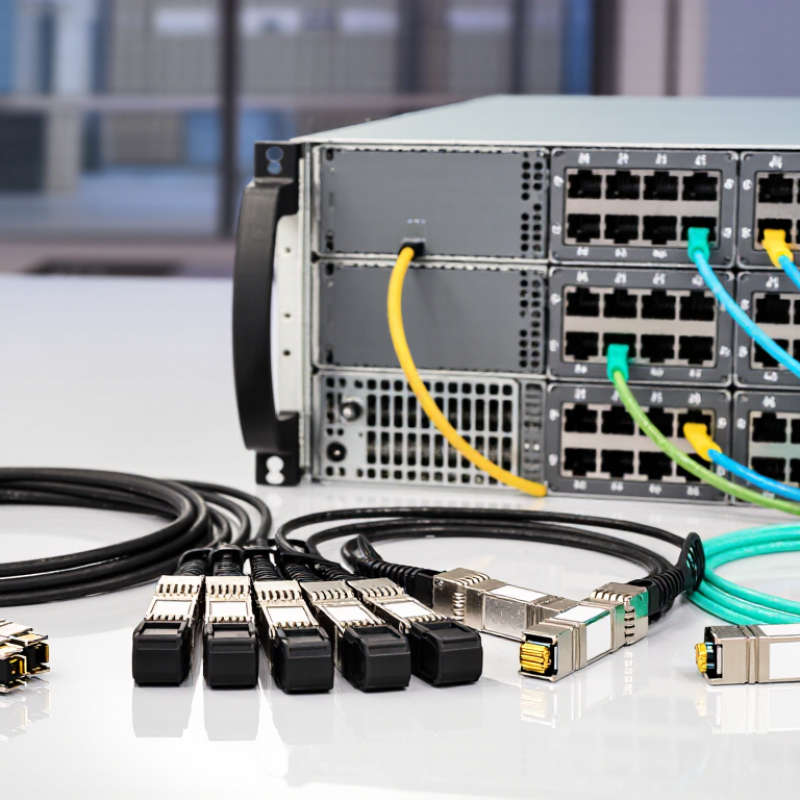
A 10Gb SFP cable connects network equipment through an SFP+ port, but the term covers different link types. A direct-attach copper cable carries electrical signals over twinax conductors, with connector assemblies at both ends. It suits short connections between nearby switches or servers. With fiber, separate optical transceivers convert electrical signals into light, send them through fiber, then convert received light back into electrical signals. The distinction matters. A cable alone does not guarantee compatibility.
IEEE 802.3ae specifies 10 Gigabit Ethernet over optical fiber. For 10GBASE-SR, the standard lists maximum distances of 300 meters on OM3 fiber and 400 meters on OM4 fiber. These figures depend on compliant components and installation conditions. SFP+ electrical and mechanical requirements are also described in SFF-8431. That label can mislead: connector fit does not prove that a cable’s coding, length, or signal characteristics match the equipment. A real rack may also have tighter bends or warmer airflow than a lab setup.
Tip: Check port support, cable type, length, and fiber grade before ordering. Keep copper runs short, and avoid sharply bending fiber. Verify the link with the device’s diagnostics after installation. Small details matter. Even a neat-looking connection can fail under load.
Key Types, Specifications, and Compatibility Requirements
For 10Gb links, buyers usually compare passive DAC, active DAC, and active optical cables. Passive DAC uses twinax copper and suits short connections inside a rack. Active DAC adds signal conditioning for longer copper runs. AOC carries optical signals over a fixed cable, which can help between racks. Check the intended distance, not just the cable type. Shorter is often simpler.
Read the specifications closely. Common details include 10Gb/s data rate, cable length, connector type, wire gauge, and operating temperature. A passive DAC may draw less power, while an active option can support a longer reach. AOC avoids copper’s reach limits, but its ends are usually fixed and cannot be separated. Small detail, big consequence.
Compatibility needs a practical check. Confirm that both devices have SFP+ ports and support the cable’s speed and power requirements. Review each device’s compatibility guidance and whether coded EEPROM identification is required. A cable that fits physically may still be rejected by a switch. Test it in the actual ports before ordering a large batch. I would also leave room for a little uncertainty: firmware updates can change behavior, and published compatibility lists may not cover every hardware revision.
How to Evaluate China-Based 10Gb SFP Cable Suppliers
When evaluating China-based 10Gb SFP cable suppliers, start with the cable type and your actual link requirements. A direct-attach copper cable may suit short connections inside a rack, while an active optical cable can help with longer runs. Ask for the supported lengths, power needs, operating temperature, and connector details. Small differences matter.
Request a datasheet and test records for the exact model, not just a general product range. Useful evidence may include testing at the relevant 10Gb data rate, compatibility checks, and inspection records for each production batch. Test a sample in your own switches if possible. Check link stability, cable fit, and performance after repeated connections.
Ask how the supplier tracks materials, handles defects, and maintains consistent production. Clear answers are a good sign. A polished PDF is not proof, though. A sample can pass while a later batch varies, so keep records and inspect incoming orders.
I would also compare response quality and lead-time promises, not price alone. Some details are easy to overlook. Raw test data may be difficult to interpret without context, so ask what each result means for your installation.
Notable Chinese Suppliers and Their Product Offerings
Chinese suppliers of 10Gb SFP+ cables typically offer passive direct-attach copper (DAC), active DAC, and active optical cables (AOC). DAC options suit short links inside a rack, such as connecting a switch to a nearby server. AOCs can support longer runs with less cable weight. Many suppliers offer several lengths and connector configurations. Exact compatibility varies.
Tips: Request the cable’s coding details, supported equipment list, and test report. Check the specified length and operating temperature. A sample test can reveal fit issues before a larger order.
A capable supplier should explain how each cable type fits your setup, rather than treating every 10Gb link as interchangeable. Ask about connector inspection, production testing, labeling, and traceability for individual batches. Clarify lead times and packaging, too; a cable arriving late can delay an otherwise simple rack installation. I would not rely on a broad “compatible” claim alone. Equipment firmware and port requirements may affect performance, and published specifications can change. Compare the datasheet with your switch or network adapter documentation, then confirm important details in writing. A small uncertainty can matter.
10GbE Link Reach by Fiber Standard
Reference distances for comparing common 10GbE optical link options
Standardized maximum reach depends on the PHY and fiber type: 10GBASE-SR supports up to 300 m over OM3 or 400 m over OM4 multimode fiber; 10GBASE-LR reaches up to 10 km and 10GBASE-ER up to 40 km over single-mode fiber. These are standards-based reference figures, not guarantees for a specific supplier’s product.
Global Buying, Compliance, and After-Sales Considerations
Global buyers should assess more than price when sourcing 10Gb SFP cables. Confirm cable type, length, connector coding, and compatibility with the intended switch ports. Request test records for insertion loss and interoperability, plus clear documentation for material and origin declarations. Requirements vary by destination, so verify current import and environmental rules before shipment. The Uptime Institute’s 2024 Global Data Center Survey found that 55% of respondents had experienced an outage in the previous three years. That figure is not cable-specific, but it underlines why traceability and dependable replacements matter.
Tips: Ask suppliers to identify each cable batch and provide a written warranty, replacement process, and response-time commitment. Keep records. Check whether samples match production units, especially for cable length and labeling. A low quote can conceal slow returns or unclear support. I have seen paperwork become an afterthought; it should not.
For cross-border orders, agree on packing standards, delivery terms, and responsibility for damaged shipments before payment. Keep invoices, product specifications, and test reports together for customs review and future audits. After installation, track failures by batch and port, then share evidence with the supplier. This feedback can reveal recurring compatibility issues, though it will not fix every network problem.