Smart Heating Solutions
What Is an Inspection Machine for Printing?
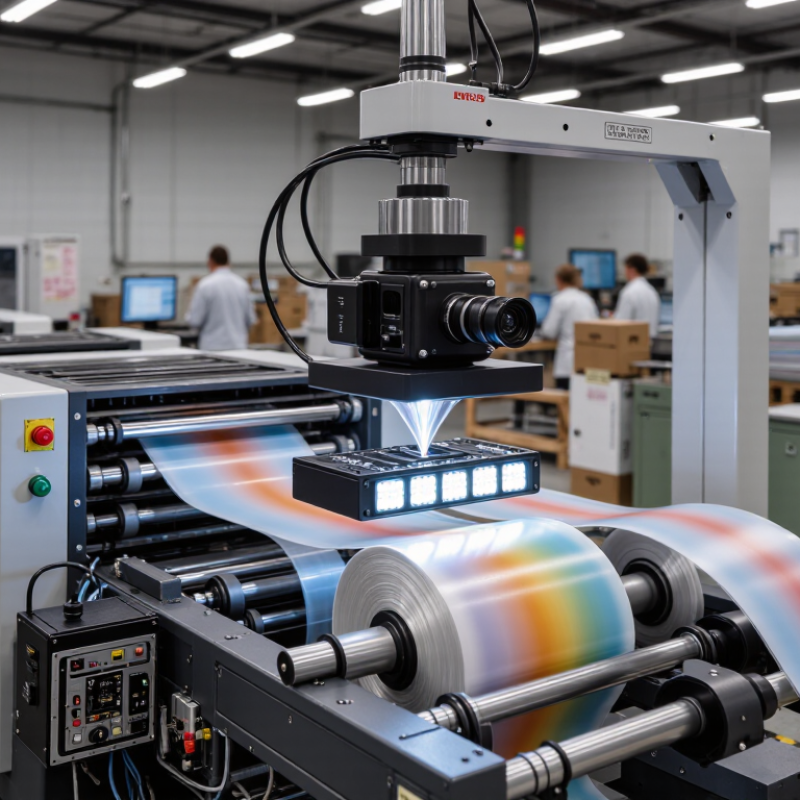
An Inspection Machine For Printing is a quality-control system that examines printed webs, sheets, labels, cartons, and flexible packaging during production. It uses cameras, lighting, software, and sensors to detect missing text, color variation, registration errors, streaks, pinholes, and surface damage. In practice, a camera may inspect a moving film at several hundred meters per minute, while software compares each image with an approved reference.
The need is growing with packaging complexity. Smithers’ The Future of Global Packaging to 2028 forecasts continued expansion in global packaging demand, driven by food, healthcare, e-commerce, and brand protection. Its analysis also highlights stricter quality expectations and greater use of digital production controls. The 2024 drupa Global Trends report similarly identifies automation and workflow integration as important investment priorities for print businesses. These findings explain why inspection is moving closer to the press, rather than remaining only a final manual check.
The machine is not simply a faster operator. It creates measurable evidence, supports traceability, and can trigger alarms or reject systems before thousands of defective impressions accumulate. That matters beside a rewinder, where a tiny registration shift can repeat across an entire roll. Still, no camera catches everything. Poor lighting, unstable material, incorrect reference images, and weak operator training can produce false alarms or missed defects. This article examines how inspection machines work, which technologies they use, and where their limitations deserve honest attention. A perfect inspection claim should be questioned. Reliable quality comes from equipment, process discipline, and experienced judgment working together.
Definition and Purpose of a Printing Inspection Machine
What Is an Inspection Machine for Printing?
An inspection machine for printing is an automated quality-control system. It checks printed material while production is still running. Cameras scan each sheet, web, label, or package surface. Software compares the live image with an approved reference. It can detect missing text, color shifts, streaks, smudges, pinholes, and registration errors.
Its purpose is practical: prevent defective print from reaching customers. A machine may trigger an alarm, mark the faulty section, or remove it from the production flow. This protects brand consistency and reduces waste. Smithers’ The Future of Packaging Print to 2028 places the global packaging-print market at more than 500 billion dollars by 2028. At that scale, even a small defect rate can create significant material losses. Inspection data also helps operators identify repeating problems, such as unstable ink density or contaminated rollers.
It is not a perfect replacement for skilled inspection. Poor lighting, incorrect reference files, and loose tolerance settings can produce false alarms. That weakness matters. Operators must verify samples and review system decisions. ISO 12647 process-control principles can support consistent color evaluation, but real production conditions still vary. In practice, the strongest inspection process combines cameras, measurement data, operator experience, and documented checks. The machine sees quickly. People still need to think carefully.
What Is an Inspection Machine for Printing? - Definition and Purpose of a Printing Inspection Machine
| Data Dimension | Description | Typical Information or Range | Purpose in Printing |
|---|---|---|---|
| Definition | A printing inspection machine is an automated vision system that examines printed material during or after production. | Uses cameras, lighting, image-processing software, and production data. | Detects defects more consistently than unaided visual inspection. |
| Inspection Position | The system can inspect material inline on the press or offline after printing, slitting, laminating, or finishing. | Inline systems provide immediate feedback; offline systems support final quality verification. | Helps identify whether a defect was created during printing or a later converting step. |
| Common Defects | The machine compares the printed image with a reference image or predefined quality limits. | Missing text, spots, streaks, smears, color variation, registration errors, pinholes, and print-to-print differences. | Prevents defective labels, packaging, documents, and finished products from reaching customers. |
| Imaging Technology | Imaging hardware captures the printed surface while software analyzes image differences. | Line-scan cameras are commonly used for continuous web inspection; area-scan cameras are used for individual sheets or objects. | Provides stable, repeatable inspection across moving rolls, sheets, or finished packages. |
| Lighting System | Controlled illumination makes print defects easier for the camera and software to distinguish. | Visible, diffuse, directional, or ultraviolet lighting may be selected according to ink, substrate, and defect type. | Reduces reflections and improves contrast on paper, film, foil, board, and other substrates. |
| Quality Checks | Inspection rules are configured for the requirements of a specific print job. | Image presence, text and barcode readability, color consistency, dimensional position, registration, and surface cleanliness. | Supports both appearance-based quality control and functional verification. |
| Defect Response | When a defect exceeds the configured tolerance, the system records and reports its location. | Possible actions include an operator alarm, defect marking, web guiding, roll mapping, or automatic rejection. | Allows operators to correct process problems quickly and isolate nonconforming material. |
| Production Data | The system can link inspection results with job, roll, sheet, or position information. | Defect images, timestamps, coordinates, defect categories, counts, and inspection reports. | Improves traceability, root-cause analysis, operator review, and customer documentation. |
| Printing Applications | Inspection machines are used across several printing and converting processes. | Labels, flexible packaging, cartons, commercial print, books, security print, newspapers, and industrial graphics. | Matches inspection requirements to the value, complexity, and compliance needs of the product. |
| Main Benefits | Automated inspection supports stable quality control throughout a production run. | Less manual sampling, earlier defect detection, reduced waste, better traceability, and more consistent output. | Protects product quality while improving process efficiency and reducing the risk of costly recalls or rework. |